
Can you trust this page?
If you look in the address bar (at the top of this page) you will see that this page is on the blog.bham.ac.uk site. This tells you that the page is within the bham.ac.uk internet domain which is owned by the University of Birmingham. If you came to this page to confirm if a test phishing email really was a test, then also check that the image of the email below matches the email you were sent.
What we did
On Tuesday 21st October, IT Security sent a simulated phishing email to a number of staff.
The email claimed to be
– From: zoom.notification at office-site.org
– Subject: “Important Account Activity: Stay Connected Securely with Zoom”
– it pretended that there was a recent login, on your account, but if it was not you, then you should reset your password
– it had a link to Reset Your Password.
If you clicked on either link, you were asked for your username and password on a screen which resembled your usual login page. Those people who entered any username and password were taken to a page reassuring them this was a benign phishing simulation by IT Security. No passwords were collected or stored!
Why we did this
This is about learning not blaming. We think of this as serving the same purpose as an unannounced fire drill, to make people more aware of the most common ways that criminals steal passwords. Our aim is not to penalise, embarrass or make anyone feel bad if they “fell for the scam”. You are not in any trouble because of this. No-one will be “named and shamed”. Your line manager(s) will not be told.
This simulated phishing email is based on real-life examples of malicious emails intercepted by our automated defences.
An image of the email – with the suspicious parts marked in red

This email does not contain many of the “tell-tale” signs, but it is suspicious because:
- It comes from outside the University, as you would expect if it was from Zoom,
BUT- the Sender email address is office-site.org not zoom.com or zoom.us as you would expect if it was from Zoom.
- the Sender email address is office-site.org not zoom.com or zoom.us as you would expect if it was from Zoom.
- This email does not have many of the tell-tale signs of spam/phishing we may have relied on in the past. This is because attacks are become more sophisticated:
- correct spelling, grammar and style do not mean that it is a genuine email. Some scammers can write perfect English – with or without the help of AI tools such as Microsoft CoPilot or ChatGPT.
- Genuine logos and backgrounds are easily copied from the real sites.
- The email is trying to cause panic. Scammers try to trigger your emotions to cloud your judgement so that you rush. Always Pause and Think before you Click.
- When you reach the sign-in screen, the URL at the top says office-site.org
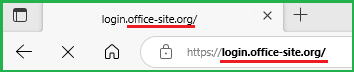
Some scammers copy real logos and backgrounds from genuine websites to fool you – so always look carefully at the address bar at the top of all sign-in screens. - It asks for a username and password. Any email which links to a place where you are asked to give your username and password, should be treated with caution – you should pause, think and ask yourself:
Who is the email really from? Whose page are you actually signing into?
Does the sending address and URL at the top of the sign-in screen match the alleged Sender?
In this case, the Sender’s email domain address is
@office-site.org
not
@zoom.com or zoom.us or bham.ac.uk
as you might expect if were really from Zoom or the University of Birmingham.
Where does the link take you?
You can reveal the full address:
- on a computer, by hovering the mouse pointer over the link (without clicking on it!)
- on a phone/tablet by a long press holding down on the link.
⭐ A note on urldefense.com. If you hover the mouse pointer over the Reset Your Password link you will see that the link begins with urldefense.com/v3/ (shown underlined in green in the picture above). This is part of our new security system to help protect us from harmful external websites.
🛡️ How it works:
In an email, when you click a link to an external website, it first goes through Proofpoint URL Defense at urldefence.com (currently at version3).
This system checks the website for known unsafe features.
If the site seems safe, you’ll be taken to the destination address as normal.
If the website is obviously dangerous, you’ll be blocked from visiting it.
⚠️ What you should still do:
Even though this adds protection, criminals are creating new harmful sites quickly. So it’s still important to look carefully at the original link after urldefense.com/v3/ to make sure it looks trustworthy and matches what you expect.
In this case the final destination (shown underlined in red in the image above) is office-site.org not zoom.com or zoom.us as you would expect if it was from Zoom.
You should always ask yourself the following:
- was I expecting this email?
- is the Sender known to me?
- and was I expecting them to send such a message or (in some cases) share a file?
- is the sign-in screen URL correct?
💡In future: if you receive a suspicious email, please don’t simply ignore or delete it, but use the Report button in the Outlook menu. This trains our automated systems and helps to protect less expert/less alert colleagues from items which slip past our defences. If enough people report an email, all copies will be pulled into Quarantine, pending assessment. Using the Report button is much faster than opening an incident ticket or emailing IT Security.
| Further quick training (5-10mins). Fraudsters are very devious in using addresses which look similar to genuine ones. This page, from CalTech, shows you how to read URLs (web addresses) correctly, to help you to avoid some of the dirty tricks used https://www.imss.caltech.edu/services/security/recommendations/how-to-read-urls You can test your knowledge by identifying which of 10 emails are legitimate or phishing in this quiz https://www.phishingbox.com/phishing-iq-test/quiz.php |
If you work or study at the University of Birmingham and have questions or comments about this phishing campaign, then contact: itsecurity@contacts.bham.ac.uk