
Can You Trust This Page?
Look at the address bar at the top of this page. This page is on blog.bham.ac.uk. This tells you that it is part of the official bham.ac.uk domain owned by the University of Birmingham.
If you came here to verify whether a suspicious email was part of a phishing simulation, then check that the image below matches the email you received.
What we did
On 10th and 31st March and also on 15th April, IT Security sent simulated phishing emails to selected staff. It appeared to be:
- From: MS Teams <no.reply@bham-ac.net>
- Subject: New Team Request
The email pretended to be a a message from Microsoft Teams saying you have been added/invited to a new team. It was personalized with your First Name and your Full Name to make you think it was genuine. Clicking on the link led to a login screen which asked for your University email address and your University password.
Important: No credentials were collected or stored. Anyone who entered details was redirected to a page confirming this was a safe simulation.
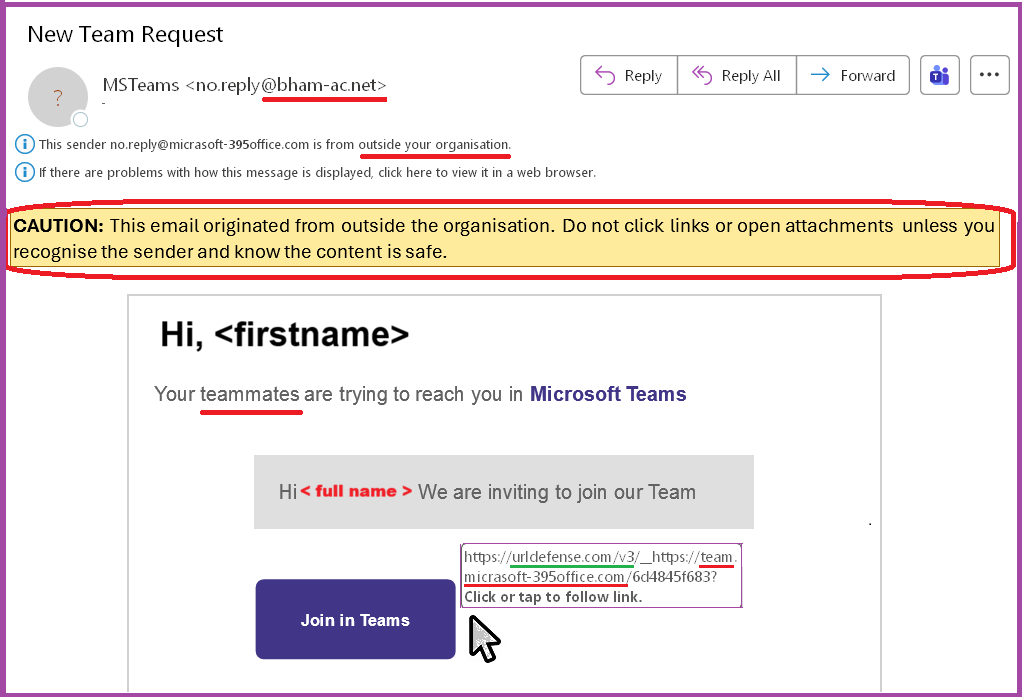
An image of the email – with the suspicious parts marked in red
What Made the Email Suspicious?
- It came from outside the University,
BUT- It says “your teammates are trying to reach you in Microsoft Teams”.
- the Sender email address is no.reply@bham-ac.net which is nothing to do with the University or Microsoft.
- it asks for your University password.
- It looks like a Microsoft Teams Join link but the link is to team.micRAsoft-395office.com
- It addresses you by name. This is common in genuine emails – but fraudsters also do this.
- The sender address from the domain @bham-ac.net does not match the Join in Teams address of team.micrasoft-395office.com Neither address belongs to the organisations they claim to represent.
- This email does not have many of the tell-tale signs of spam/phishing we may have relied on in the past, such as poor spelling and grammar. This is because attacks are become more sophisticated.
- This uses your name – which is becoming a more common tactic used by scammers, so that you won’t Pause and Think before you Click.
- If you reached the sign-in screen, the URL at the top says team.micrasoft-395office.com – which is nothing to do with the University or Microsoft.
NB: scammers often copy real logos and backgrounds from genuine websites to fool you – so always look carefully at the address bar at the top of any sign-in screen.
- It asks for a username and password. Any email which links to a place where you are asked to give your username and password, should be treated with caution.
Pause and Think Before You Click.
- Nothing is so urgent you can’t stop and think.
- Be cautious if an email asks for your username and password. Avoid using a direct email link to reset your password, go the webpage using a browser and login that way.
- Always check the URL of sign-in pages.
- Hover over links (or long-press on mobile) to reveal the full destination address.
About URLDefense
Links in emails may begin with urldefense.com/v3/ — part of our security system that checks external websites for threats.
Even with this protection, you should still inspect the final destination URL to ensure it’s legitimate.
What You Can Do
- Ask yourself:
- Was I expecting this email?
- Do I know the sender?
- Does it “seem right”?
- Is the sign-in screen URL correct?
If you receive a suspicious email:
- Use the Report Email button in the Outlook menu – it’s faster and helps protect others.
- The Report Email button trains the system automatically which can automatically quarantine all copies of a problem email.
- If a link seems suspicious then don’t click on it! – even “carefully” to enter dummy details, out of curiosity or “just to be sure”. In a real attack, there is a risk of a “zero-day” “drive by download” which your browser might not protect you against. You are playing with fire.
Why we did this
This exercise is about awareness, not blame
- No one is in any trouble because of this.
- No one will be named or shamed.
- Line managers are not told of any individual’s actions or inactions.
Phishing emails are the top method criminals use to steal passwords, break into systems, steal identities and commit fraud. This simulation is based on real-life threats intercepted by our security systems. These real-world threats often use attention-grabbing “hooks” that tie into current news, trending topics, seasonal events, prizes or workplace-related items such as HR, payroll or IT notices.
Think of it as a fire drill for your Inbox – unexpected, harmless and designed to prepare you for the real thing. This supplements theoretical training. We don’t wait for a real fire to practice escaping – so why wait for a real scam to practice spotting one? Most people accept that a little inconvenience and brief alarm are a small price to pay for stronger security in today’s risky cyber world.
Further quick learning (5-10 mins)
Fraudsters are very devious in using addresses which look similar to genuine ones. This page, from CalTech, shows you how to read URLs (web addresses) correctly, to help you to avoid some of the dirty tricks used https://www.imss.caltech.edu/services/security/recommendations/how-to-read-urls
You can test your knowledge by identifying which of 10 emails are legitimate or phishing in this quiz https://www.phishingbox.com/phishing-iq-test/quiz.php
Questions or Comments?
If you work or study at the University of Birmingham and have questions or comments about this phishing campaign, then contact: itsecurity@contacts.bham.ac.uk