
Can you trust this page?
Look at the address bar at the top of this page. This page is on blog.bham.ac.uk. This tells you that it is part of the official bham.ac.uk domain owned by the University of Birmingham.
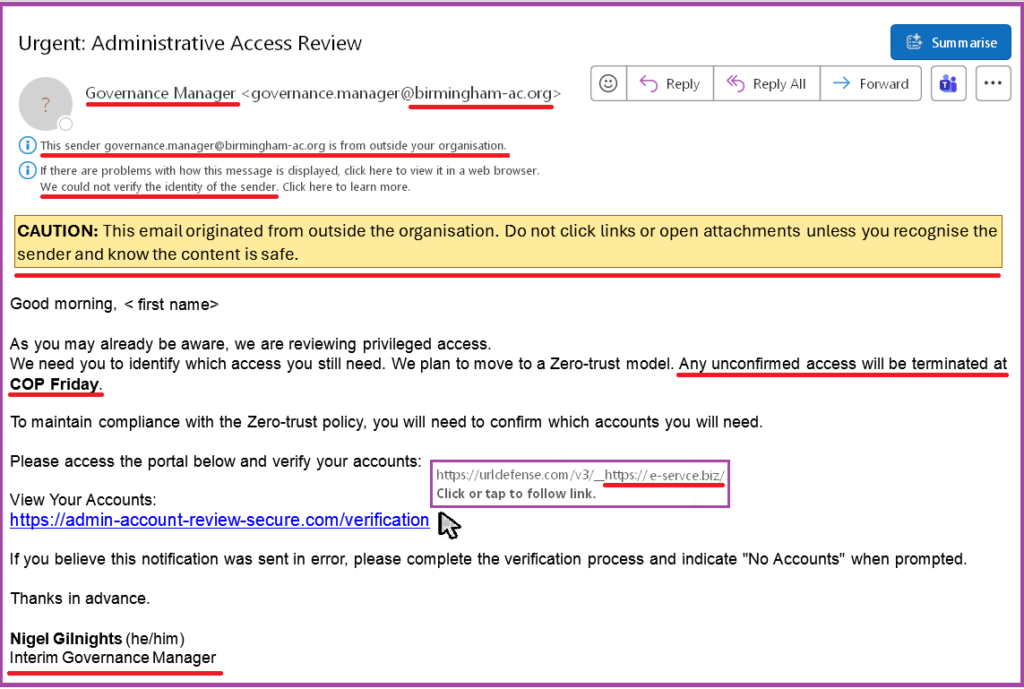
If you came here to verify whether a suspicious email was part of a phishing simulation, then check that the image below matches the email you received.
What we did
On 7th September 2026, IT Security sent a simulated phishing training email to IT-related staff. It appeared to be:
- From: Governance Manager <governance.manager@bham-ac.org>
- Subject: Urgent: Administrative Access Review
- Greeted the recipient by their first name
- Linked to a fake Microsoft login page requesting your University email and password
It pretended to be an urgent communication from someone working as Interim Governance Manager for the University and encouraged recipients to enter their University credentials on a fake sign‑in page.
Anyone who entered details was redirected to a confirmation page explaining that: no password information had been collected, that line managers would not be told and that they were not in any trouble because of this. They were shown an image of the suspicious email with the suspicious parts underlined.
What the email looked like
(with the suspicious parts underlined)
Why the email was suspicious
⚠️ An unknown sender, from someone outside the organization, telling you to verify a University account?
This should immediately arouse suspicion.
The Sender address governance.manager@bham-ac.org does not belong to the University or Microsoft.
⚠️ Unfamiliar person. Have you heard of “Nigel Gilnights”? Do you trust them? Always question unexpected requests from unknown individuals.
⚠️ It requested your University password
Genuine University emails do not direct you unexpectedly to a login page requesting credentials.
The link pointed to e-service.biz, which is not a legitimate University or Microsoft domain.
⚠️ Personalisation can be faked
Attackers often use your name or personal details to make an email look more convincing. If another University account, with GAL access had been compromised it would have access to full names.
⚠️ The sign‑in page URL was suspicious

Although the fake login page looked genuine, the address bar showed e-service.biz.com. Attackers commonly copy logos and layouts from real sites, so always check the URL before entering passwords.
⚠️Other manipulations
The warning that your account will be terminated creates a sense of urgency and anxiety to stop you thinking. Most fake emails try to manipulate your emotions to trigger you into an immediate response without giving yourself time to think.
About URLDefense
The University uses Proofpoint URL Defence to scan links in incoming emails. It helps to protect against known malicious websites, but it is not a replacement for vigilance. Criminals constantly create new websites, so you should always check where a link is actually going to before clicking.
Tip: Look at the right of the text-string urldefense.com/v3/ to identify the real destination domain – in this case e-servce.biz
How to protect yourself
Nothing is so urgent that you can’t Pause and Think before you click
- Was I expecting this message?
- Do I recognise the sender?
- Does the message look appropriate?
- Is the URL genuine?
- Hover over links (or long-press on mobile) to reveal the full destination address.
- Always check the URL of sign-in pages
- Be cautious if an email asks for your username and password.
- Avoid using a direct email link to reset your password, go the webpage using a browser and login that way.
Don’t ignore threats – use the Report Email button in Outlook to report any suspicious email
If a message looks suspicious enough to make you hesitate, then report it. You do not need to be 100% certain that an email is malicious – even a slight suspicion is enough reason to report.
Using the Report Email button helps protect others by training our security system to automatically detect and quarantine similar threats from all mailboxes pending review. This protection operates 24/7 including weekends and holidays.
If the email is part of a training exercise, you’ll see a notification as soon as you click the Report Email button. Even if you are confident that an email is a training exercise, please report it anyway. Your report helps us measure the effectiveness of our last line of defence: you.
If a link seems suspicious then don’t click on it! Resist the temptation to “carefully” enter dummy details, out of curiosity or “just to be sure”. In a real attack, there is a risk of a “zero-day attack, which your browser and security software won’t protect you from. Don’t play with fire.
If a link looks suspicious, don’t click it! Resist the temptation to “test” it by “carefully” entering dummy information out of curiosity. In a real attack, the malicious website could exploit a previously unknown vulnerability, known as a zero-day vulnerability, that your browser or security software cannot yet detect. Don’t play with fire.
Why we run these exercises – awareness not blame
This simulation is part of the University’s ongoing security awareness work. No individuals are blamed or identified, and managers are not given any results which could identify any individual.
Phishing remains one of the most common methods of credential theft. Simulations help staff recognise real threats, much like fire drills prepare people for emergencies.
Learn more (further quick training 5-10 mins)
Fraudsters are very devious in using addresses which look similar to genuine ones. This page, from CalTech, shows you how to read URLs (web addresses) correctly, to help you to avoid some of their dirty tricks https://www.imss.caltech.edu/services/security/recommendations/how-to-read-urls
You can test your knowledge in this quiz by identifying which of 10 emails are legitimate or phishing https://www.phishingbox.com/phishing-iq-test/quiz.php
Questions or comments?
If you work or study at the University of Birmingham and have questions about this simulation, please contact:
itsecurity @ contacts.bham.ac.uk